


.svg)

When it comes to CRM deployments, most firms go through an elaborate process of evaluation and vendor assessment before making their final decision. However, often, they tend to significantly under-estimate the total cost of ownership of their ultimate choice, thereby diluting the business impact and ROI from a financial perspective.
MS Dynamics and Salesforce CRM have been default choices in this space when it comes to enterprise platforms. Does that mean no matter what the scale and/or complexity (of the domain), they will always deliver the best outcomes? In this article, we have disaggregated the various components of a CRM deployment and ongoing engagement, bringing an acute understanding of the lifecycle of such an investment, to highlight some of the challenges and not-so-attractive outcomes.
We find in the specialised space of institutional broking and investment banking, the two aspects that work against a healthy ROI are: (a) under-estimating the workflow complexities in the customisation and deployment phase; and (b) relatively low seat count requirements, making the economics of a “build-out” challenging from the start.
Most CRM business cases start with a deceptively clean comparison:
Not because MS Dynamics or Salesforce are “bad” products, they’re powerful, mature platforms. But because they are platforms first. When you deploy a horizontal CRM into a niche business (institutional equities, research distribution and entitlements management, corporate access, investment banking coverage, advisory deal origination, etc.), you are not “installing a CRM.” You are starting a software product journey with all the operational costs and organisational gravity that implies.
The real Total Cost of Ownership (TCO) doesn’t explode on Day 1. It explodes in Year 2, when your firm realises it didn’t buy a finished solution, it bought an unfinished promise.
Licensing cost (of a CRM) is the most visible number, and so it becomes the anchor. But licensing cost is rarely the economic driver in a deployment of 100 or 1000 seats.
The economic driver is the stuff that doesn’t fit neatly into a procurement spreadsheet:
If your evaluation is mostly a licensing comparison, you are essentially choosing the cheapest steering wheel and assuming the car will appear around it.
Over the years of deploying CRMs in the capital markets space, we have broken down the Total Cost-of-Ownership into the following clear components:
We at ANALEC undertook a detailed assessment of putting MS Dynamics and Salesforce CRM in a “bake-off” with InsightsCRM. We look at all the domain- and business-centric capabilities embedded within our offering of InsightsCRM and estimated the workload to bring a generic offering like Dynamics and/or Salesforce in line with the needs of our target audience. Additionally, we projected the user and deployment lifecycle as per the components listed above. The final result was quite revealing, as the graphic below highlights.
“We undertook the exercise to ensure a complete like-for-like comparison with our specialised offering and found that on a TCO basis, InsightsCRM comes out at no more than 20-25% of the TCO of a Salesforce (and/or MS Dynamics) deployment.”

The above graphic starkly highlights how the actual licensing cost (per seat) is such a tiny component in the overall TCO assessment of a Dynamics of Salesforce deployment.
The Initial build/customisation costs, despite their amortisation over 3 years, tend to significantly bloat the costs on all such projects, with the costs associated with regular fixes/upgrades/enhancements at a close second.
Horizontal CRMs typically give you:
What they DON’T give you out of the box (in most capital markets contexts) is the part that defines business value:
That’s the business-ready gap, and it’s where timelines start to drag, because requirements move from “what the platform supports” to “what the desk needs to win.”
One internal TCO comparison (in the institutional broking context) estimated that getting a horizontal CRM “business ready” can drive lead times of 20–24 months, versus less than 4 months for a domain-centric SaaS already built around those workflows.
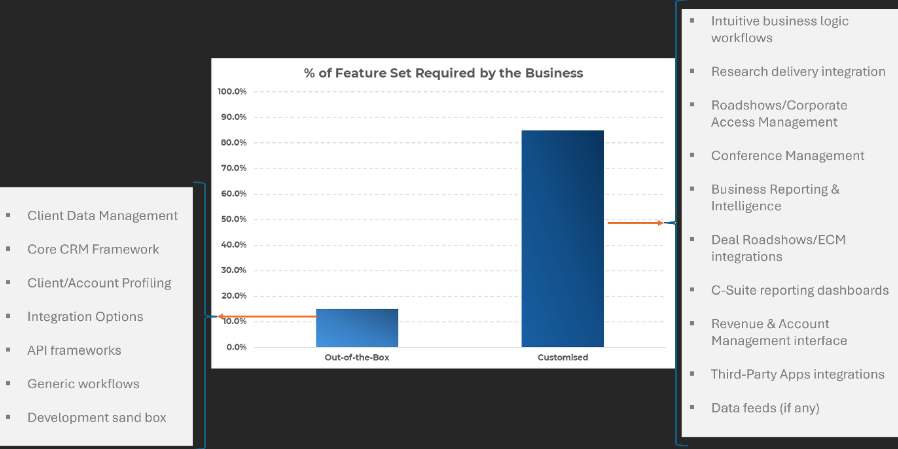
Here’s the part most teams underestimate:
A CRM is not “implemented.” It is entered into a relationship.
Every CRM that is actually used becomes a living system:
And every one of these becomes either:
This isn’t failure. It’s normal. The failure is budgeting for these items as if they won’t happen.
A useful mental model:
If you choose a platform CRM, you are committing to maintaining engineering velocity.
Not occasionally. Continuously. Month after month.
That same TCO analysis makes the point directly: enhancement/fix cycles are “massively underestimated,” yet every platform must sustain velocity to incorporate user feedback, address defects, and keep technology current.
This is where platform TCO quietly becomes structural.
Users don’t just need training. They need:
If you don’t fund support, your ROI collapses not because the software is bad, but because your users revert to email threads, spreadsheets, and personal notes.
And here’s the nuance many teams miss:
Microsoft Dynamics/Salesforce will support the platform. They will not support your business-specific implementation the way your users expect.
So the burden falls on you.
User-level support is a real operating cost that compounds with adoption.
Once you have customisations and integrations in place, you need:
This isn’t “nice-to-have maturity.” It’s the cost of not breaking the desk during quarter-end, conference season, or earnings cycle.
When firms ignore this, what they’re really doing is choosing one of two outcomes:
Neither outcome is cheaper nor a desirable outcome!
CRM timelines don’t drag because teams are incompetent.
They drag because CRM is workflow + politics + data quality + integrations + behavior change.
A platform CRM implementation faces predictable timeline gravity:
A domain-centric SaaS offering like InsightsCRM can compress this because the “unknown unknowns” are already productized. You are configuring, not inventing.
That time-to-value delta in a generic CRM deployment isn’t cosmetic. It directly converts into:
In other words, opportunity cost is a real cost, even if your spreadsheet doesn’t include it.
If the TCO story is so obvious, why do smart firms still choose big platforms for small user bases?
Because decisions are rarely made on TCO alone. They are made on risk, optics, organisational incentives and political considerations.
Common drivers:
No one gets fired for selecting a household name especially when procurement, IT governance, and audit committees are involved.
Corporate-level leadership likes the idea of a unified platform across divisions, even if the workflows are fundamentally different.
Platforms are configurable. But configurable is not the same as complete.
Configurable means you can build it. Not that it already exists.
Software Implementation economics reward build complexity. Domain SaaS economics reward time-to-value and retention.
Some firms prefer to “own” their workflow logic and “source code” - even if that means owning the cost and maintenance burden forever.
These are rational motives. But they often clash with a simple seat-based economic truth.
Domain-centric SaaS providers win TCO arguments for one primary reason:
They amortise domain complexity across many clients, so you don’t have to.
Instead of building:
….you adopt them.
Our TCO comparison asserts that a domain-centric CRM like InsightsCRM can meet roughly 90-95% of capabilities out of the box, drastically reducing setup/customisation costs, while bundling user support (e.g., 24x5 user-level help desk) into the standard service rather than turning it into separate headcount economics.
The strategic point is bigger than the features. Domain SaaS transfers operating complexity from your cost base to the vendor’s product roadmap.
That’s what “total package” really means.
If your user base is 100 or 1000, the decisive question isn’t “Which CRM is best?”
It’s: Do we want to run a CRM product organisation inside our firm? Because that’s what platform builds become.
A practical decision filter:
Choose a horizontal platform (Dynamics/Salesforce) if:
Choose a domain specialist SaaS if:
CRM TCO is ultimately a strategy decision about where you want complexity to live:
For 100–1000 seats, the odds overwhelmingly favour the second option because the fixed cost of “making a platform behave like a finished product” is disproportionately high, and the opportunity cost of slow delivery is disproportionately painful.
The uncomfortable truth is this:
When you buy a platform CRM for a niche workflow, you don’t avoid vendor lock-in; you lock yourself into your own build.
And that’s the most expensive lock-in of all.


